The simplest way to carry earbuds on a run is in a zipped pocket on a running belt or hydration vest, in their charging case, so they never rattle against keys or your phone. Once they are in your ears, a secure fit comes down to three things: the right tip size, a proper seal, and a design that suits the surface you run on. This guide covers all of it, from carrying the case without bounce to avoiding the thump of your own footsteps, plus the safety and race-rule points that most earbud guides skip.
TL;DR
- Carry the charging case in a zipped, close-to-the-body pocket on a belt or vest, not loose in a shorts pocket where it bounces and can fall out.
- To stop earbuds slipping, try every tip size in each ear, rotate the earbud to seal, and test the fit with a short jog on the spot before you leave.
- Sweat reduces friction, so wipe your ears and the tips before you start, and consider memory-foam tips, wings or hooks for longer runs.
- On roads, keep your awareness: use ambient mode or an open-ear design and keep the volume low.
- Check the rules of your race before you wear earbuds on the start line, especially for championship events.
Table of Contents
- Two problems in one question: carrying and wearing
- Where to carry earbuds on a run
- How to keep earbuds in your ears while running
- Reducing the thump of your footsteps
- Staying safe: awareness and volume
- Battery, sweat resistance and Bluetooth
- Can you wear earbuds in a race?
- Our perspective: fit first, then everything else
- A simple setup to try
- FAQ
- Sources
Two problems in one question: carrying and wearing
When runners search for how to carry earbuds while running, they usually mean one of two things. Either they want somewhere to put the earbuds and case so nothing is lost, or they want the earbuds to stay in their ears for 5K, 10K or half marathon distance. Both come down to the same principle we apply to every piece of running kit: anything you carry should sit still against your body.
We will take the carrying question first, because it is the one with the quickest fix, then the fit question, then safety.
Where to carry earbuds on a run
Earbuds are small, hard and easy to lose. A case in a loose shorts pocket moves with every stride, and the lid can pop open. Here are the realistic options, from simplest to most secure.
A running belt with a zipped pocket
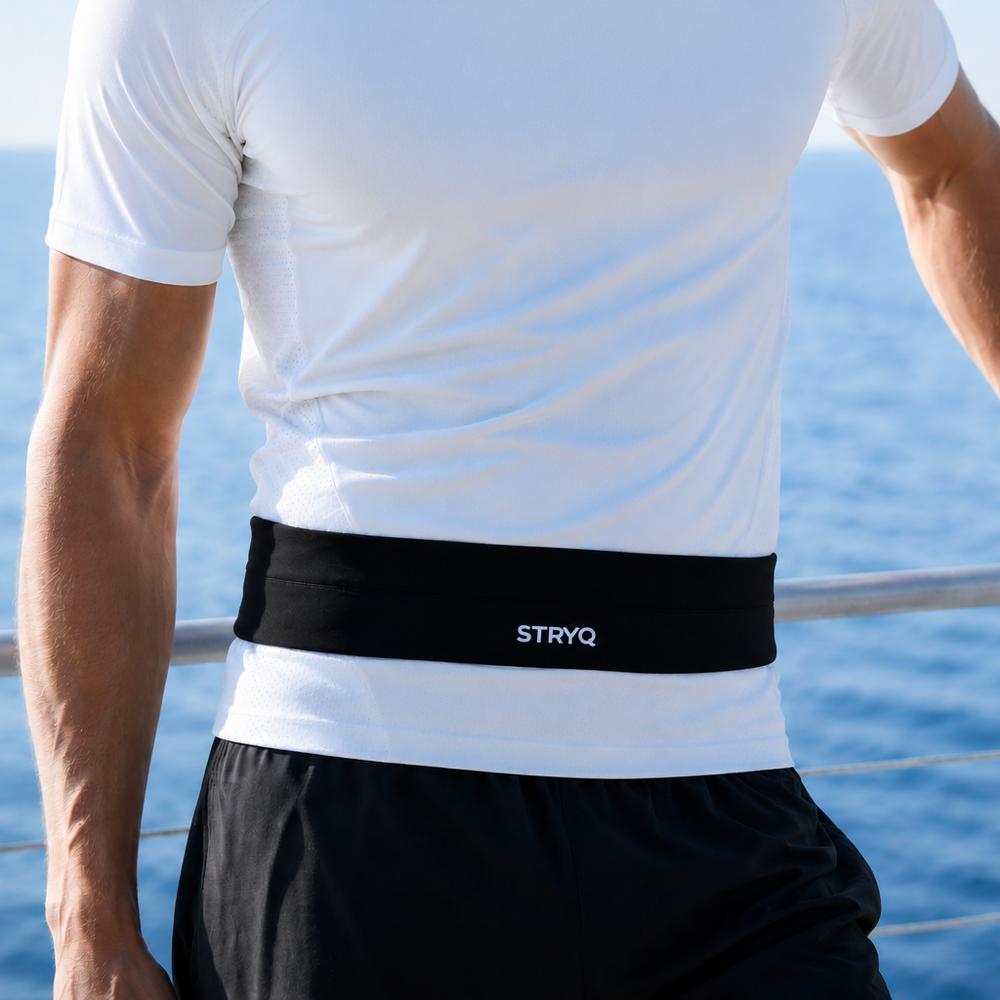
For most runners this is the best answer. A belt sits around the waist, close to your centre of gravity, so what you put in it moves far less than it would in a jacket or shorts pocket. Put the earbud case in a zipped compartment on its own, away from keys, so it does not get scratched or knocked, and keep your phone in the main pocket. If you are choosing one, our guide to choosing a running belt that stays put explains what to check, and the 200m test for running belt fit shows how to confirm the belt is tight enough before a long run.
Our STRYQ Running Belt is built with 360° storage, so you can spread phone, case and a gel around the waist rather than stacking everything at the front. Spreading the load is what stops a belt riding up.
A hydration vest for longer runs
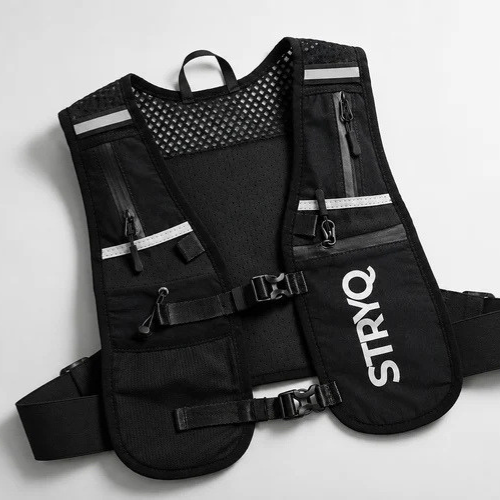
Once your runs pass an hour, or you want water, a layer and your phone as well, a vest is more comfortable than a belt. Small chest pockets close to the collarbone are ideal for earbuds because you can reach them without stopping. Adjustable straps matter here: a vest that is snug against the ribs will not bounce, and neither will what is in its pockets. Take a look at the STRYQ Hydration Running Vest, which has adjustable straps and multiple pockets, and pair it with a 500ml soft flask if you are also carrying fluid.
Armbands, pockets and hands
An armband is fine for a phone on a short easy run, but it is a poor place for a hard case. Zipped shorts or leggings pockets work if they are deep and snug, though a case against the thigh can chafe on longer runs. Carrying the case in your hand is the least secure option: you will drop it the first time you reach for a drink or stumble on a kerb.
If your phone is the other thing you are trying to carry, we cover the options in how runners carry their phone and running phone storage that stays put.
Keep the case dry
Sweat gets everywhere on a long run, including pockets against your body. Charging contacts and moisture do not mix well, so keep the case in the pocket furthest from your back or stomach where possible, and dry it after the run. We have written separately about phone sweat protection for runners, and the same logic applies to the case.
How to keep earbuds in your ears while running
Now the harder problem. Earbuds that felt secure on the sofa often work loose around the second kilometre. There is a reason for that, and it is mostly fixable.
Why earbuds slip as you run
Two forces work against you. The first is impact: each footstrike sends a small vertical shock through your head. The second is sweat. According to Earsole’s guide to running headphones and fit, sweat acts as a lubricant between ear tips and skin, which is why earbuds that were fine at the start slip as perspiration builds.
Start with the right tip size
Most earbuds ship with several tip sizes, and most people never try them all. HP’s fit guidance recommends trying every supplied tip size, including a different size in each ear, and checking both the tightness of the seal and the amount of movement when you turn your head or walk a short distance. Your ears are rarely identical, so a mismatched pair of tips is normal, not a fault.
Insert, rotate, seal
A shallow push is the usual mistake. Follow the insertion method for your model, which often involves a slight twist so the earbud locks into place. Jabra’s guidance suggests following the model’s insertion and rotation instructions and gently stretching the earlobe before insertion to help the earbud seal more tightly. A good seal also improves bass, so if the sound suddenly goes thin, the earbud has probably shifted.
Do a two-minute fit test
Before you leave the house, put the earbuds in and shake your head, jog on the spot and open your mouth wide. If an earbud moves, change the tip or the angle and test again. It is much better to find the problem on the doorstep than a mile into a run.

Prep your ears and the tips
Wipe your ears and the earbud tips before inserting them, and clean the tips regularly, because skin oils make silicone slippery. This is a small habit but it often makes a bigger difference than buying a new pair.
Choose a design that locks in
If tips alone do not hold, the design may be the issue. The main types for runners are:
| Design | How it stays put | Good for | Watch out for |
|---|---|---|---|
| Standard in-ear with silicone tips | Seal in the ear canal | Short, easy runs | Slips as sweat builds |
| Memory-foam tips | Foam expands to mould to the canal | Longer runs and heavy sweaters | Wear out and need replacing |
| Wings or fins | Anchor in the inner ear (concha) | Frequent movement, intervals | Can feel bulky |
| Over-ear hooks | Wrap over the outer ear | Long runs, hard training | Can press with glasses or a hat |
| Open-ear or cuff designs | Rest on the outer ear, not in the canal | Road running, awareness | Sound leaks, less bass |
Some of this comes from the makers and testers themselves. HP notes that memory-foam tips can mould to the ear, while stabilising wings or hooks add security for frequent movement. Earsole says that hooks wrap over the outer ear and wing tips anchor against the concha, providing a physical lock against the shock of footstrikes. Bose describes its cuff-shaped open earbuds as resting on the outer edge of the ear rather than in the canal.
There are trade-offs. A SoundGuys review of one running model found that flexible hooks, several tip sizes and removable silicone enhancers kept the earbuds stable, though they were bulky. Consumer Reports makes a similar point about one sport model: hooks and tips help it stay secure, but the bulky part may poke some users’ ears when they use the controls. Secure and comfortable are not always the same thing, so test for both on a short run before committing to a long one.
Reducing the thump of your footsteps
A common complaint is that sealed earbuds turn every footstrike into a dull thud inside your head. Sound travels through the body into the sealed ear canal, so a deep, tight fit can make it worse. Some things to try:
- Switch off noise cancelling. Sony’s support page for one model says to turn off noise cancelling or ambient sound control if walking or running vibration causes noise, and to check the fit if contact with the microphone causes rustling.
- Loosen the seal slightly. A less deep fit transmits less of the impact, though you will need to balance this against slipping.
- Try an open-ear design. With nothing sealed in the canal, the thump largely disappears.
- Soften your stride. Shorter, lighter steps are quieter in the ear and kinder to your joints.
- Manage any cable. If you still use wired earbuds, run the cable behind your neck, loop it over the ears and clip it to your collar so arm swing does not tug the earbuds loose.
Staying safe: awareness and volume
This is the part of the topic where you should be most careful. Running with something in both ears reduces your ability to hear what is around you.
Hear the road
Consumer Reports notes that not hearing background traffic while running can be dangerous, and describes ambient or transparency modes and open designs that let outside sound in. On roads, shared paths and at junctions, choose one of those. On a closed trail or a treadmill the risk is lower, but cyclists and other runners can still come up behind you quickly.
A few practical habits help:
- Wear only one earbud on busy routes, or use transparency mode.
- Take them out, or pause the music, when crossing roads or running in the dark.
- Keep your route familiar when you are listening to a podcast or a long playlist.
- Be seen as well as heard. In low light a high-vis vest and reflective bands kit helps drivers and cyclists spot you.
Keep the volume sensible
A widely quoted guide is the 60/60 rule: no more than 60% volume for no longer than 60 minutes at a time. Treat it as a simple starting point rather than a clinical limit. A more useful runner’s test is that you should still be able to hear your footsteps and your breathing. If you cannot, turn it down. Wind and traffic noise tempt you to push the volume up, which is another reason open-ear or good-fitting earbuds are worth it.
Battery, sweat resistance and Bluetooth
Bluetooth earbuds suit running provided they are sweat resistant and stay in. As a rule of thumb, look for at least an IPX4 rating, which covers splashes, and check the battery life against your longest run. Many true wireless earbuds manage roughly four to five hours per charge, according to a running headphones guide, which is plenty for a 5K or a half marathon but tight for a slow marathon. Check the maker’s own figure for the exact model, because it varies with volume and features such as noise cancelling.
For longer runs, keep the case charged and in your belt or vest pocket, so you can swap earbuds into it if the battery runs low.
Can you wear earbuds in a race?
It depends on the event. Many mass-participation 5Ks, 10Ks and parkruns are relaxed about headphones, but rules differ, and some organisers ask runners to leave them at home for safety reasons on open roads.
For events under USATF rules, Earsole’s summary of Rule 144.3 says the Games Committee can allow portable listening devices that cannot receive communication, but competitors in championships for awards, medals or prize money are excluded. The same summary notes the distinction between music-only devices and those that can receive communication, such as connected smartwatches. The earlier wording of the rule is quoted in this account of the 2008 amendment. Always read the race information pack for your event and category, and ask the organiser if it is unclear.
If you do run a race with earbuds, keep the volume low enough to hear marshals and other runners, and keep the case in a secure pocket so you are not fumbling at a water station. Our lists of race day accessories for a marathon and accessories for a 5K cover what else to pack.
Our perspective: fit first, then everything else
We design running accessories, and the lesson we keep coming back to is that most carrying problems are really fit problems. Earbuds fall out because the tip does not match the ear. Belts bounce because they are loose or overloaded. Phones swing because the pocket is too big. None of these needs an expensive fix: they need testing before the run, not during it.
That is how we develop our products. We start from feedback from everyday runners, make several sample revisions, test them on real runs and apply strict quality control before anything is launched. We would rather give you a belt or vest that does its job quietly, run after run, than one with a long list of features you never use.
For earbuds specifically, our advice is simple. Pick a design you have tested for fit, keep the case in a zipped pocket close to your body, keep one ear open to the world on roads, and take a few minutes to check your race rules. Listening should add to your run, not become something you manage.
— martin
A simple setup to try
If you want a ready answer, here is a setup that works for most runners:
- Choose earbuds with tips you have tried in both ears, and add foam tips, wings or hooks if they move.
- Wipe your ears and the tips, insert with a slight twist, and do the head-shake and jog-on-the-spot test.
- Put the case in a zipped pocket on a snug belt or vest, with your phone in a separate pocket.
- Use transparency mode or one earbud on roads, and keep the volume low enough to hear your steps.
- Run for 10 to 15 minutes, then adjust. If anything moves, fix it before your next long run.
If you are building out your kit, the STRYQ Running Belt and Hydration Running Vest both give you a secure place for earbuds, phone and fuel, and you can see the whole range on our running gear page. Our guides to securing your phone without bounce and to carrying a phone on runs over 5K are good next reads.
FAQ
How do I get earbuds to stay in while running?
Try every tip size in each ear, because the wrong size is the most common cause of slipping. Insert the earbud with a slight twist so it seals, wipe your ears and the tips to remove sweat and oils, and test the fit with a head shake or a jog on the spot. If they still move, try memory-foam tips, wings or ear hooks.
Where should I keep my earbud case on a run?
Keep it in a zipped pocket close to your body, such as on a running belt or in a vest chest pocket. Keep it apart from keys and away from your back where sweat collects. Avoid carrying it loose in your hand or in a shallow shorts pocket, where it can bounce or fall out.
Is it safe to run with earbuds in both ears?
It is safer on a treadmill or a quiet closed trail than on roads. Where there is traffic, use transparency mode, an open-ear design or a single earbud, and keep the volume low enough to hear your footsteps and breathing. Take them out in the dark, at junctions or whenever you feel unsure.
Why can I hear my footsteps so loudly in my earbuds?
A sealed earbud channels vibration from your body into the ear canal. Turning off noise cancelling, loosening the seal a little, switching to an open-ear design and shortening your stride can all reduce it. Check the fit too, as rustling is sometimes caused by the earbud or its microphone touching your ear.
Can I wear earbuds in a race?
Often yes, but not always. Rules vary by event, and under USATF rules championship competitors going for awards, medals or prize money cannot use them. Check the race information for your event and category before race day.
Sources
- Find the Perfect Fit: Earbuds that Don’t Fall Out (HP)
- Running headphones, race rules and secure fit (Earsole)
- How to find wireless earbuds that don’t fall out (Jabra)
- The Best Earbuds That Don’t Fall Out (Bose)
- JBL Endurance Peak 3 review (SoundGuys)
- 8 Best Workout Earbuds, Lab-Tested and Reviewed (Consumer Reports)
- Unwanted noise is heard from the headphones (Sony support)
- Running headphones: how to choose the best type for you (The Run)
- USATF amended rule 144.3(f) (Marathon Madman)